Showing posts with label Microsoft Windows. Show all posts

Sunday, June 19, 2011

Never Leave Your USB Drive Behind Again With USB Alert

Everyone knows the horror of looking for it when you need it only to realize that you left it behind plugged into the last computer you used.
With USB Alert, you'll get a warning when you shut down to unplug your USB drive before you go.

USB Alert will play a warning sound and display an on-screen alert every time you issue a shutdown or lock command warning you that you have a USB storage device still connected to the system. From there you can see your connected devices or dismiss the alert – but the warning makes all the difference.


Download USB Alert


How do you make sure you don't leave your drives behind when it's time to leave the office for the day?
Leave your tips in the comments.

Saturday, June 18, 2011

Malware Steals Your Bitcoin

I got my Bitcoin @nerdmeritbadge today!Bitcoins have become popular as an alternative to government-controlled currencies, but a new Trojan seems to be specifically targeting Bitcoin wallets in an attempt to steal funds, security firm Symantec warns.

The malware, Infostealer.Coinbit, is fairly simple: It targets Windows machines and zeros in on the standard file location for a Bitcoin wallet. It then e-mails the wallet — a data file containing private crypto keys — to the attacker by way of a server in Poland, according to Symantec, which was first to alert on the attack.

“If you use Bitcoins, you have the option to encrypt your wallet and we recommend that you choose a strong password for this in the event that an attacker is attempting to brute-force your wallet open,” Symantec’s Stephen Doherty wrote in a blog post Thursday.

Current exchange rates place the value of one Bitcoin to about $23.50 USD as of late Friday afternoon, according to bitcoincharts.com. For an overview of how the system works, see the currency's official site.

Earlier this week, a hack on a Bitcoin user's Windows computer was said to have resulted in the loss of the equivalent of $500,000 USD. While the amount is said to be disputed -- such a large amount transferring would have caused a drop in the value of the Bitcoin, and some claim the system wouldn't have been able to handle such a large transfer.

Regardless of the claims validity, it is believed that hackers have been able to develop botnets to exploit the Bitcoin system, Symantec reported earlier this week. It is believed that based on current valuations, these efforts could be netting these botnet owners the equivalent of $100,000 per month.

Monday, May 9, 2011

White Hat Hackers Find Skype Security Hole For Mac

Image representing Skype as depicted in CrunchBase


Skype has issued an update for all Mac users, due to security concerns in Skype version 5.x for Mac which allows a malicious user to activate code on the victim’s computer.

A security researcher said today that he found a serious hole in the Mac version of Skype and proving that it was possible to send a specific message to a user of Skype and it would crash Skype and make it unusable.

Gordon Maddern, says he discovered the vulnerability about a month ago. He was chatting on Skype to a colleague about a payload when the payload executed in the colleague's Skype client accidentally.

He created a proof of concept that can be used in an attack but is not releasing details on it until Skype fixes the issue. He could not find the vulnerability in the Skype client for Windows and Linux, he said.

Monday, May 2, 2011

Scan Your Music Library For Missing Songs

How do you make sure that no songs are missing in your library?
That every album is complete?

Applications to scan a library of songs for missing tracks are very rare.
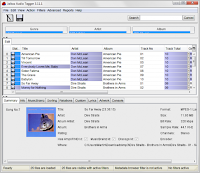
One application that can be used for the job is Jaikoz Audio Tagger.
This is not freeware but the trial version is good enough to find out if songs are missing in your whole music library.

The trial version is limited in functionality, but that is not a problem, we only use the software to find missing tracks in a local music collection, and that feature does not appear to be limited.

After installation the first step is to load the music library into the program.
This is done with a click on File --> Open Folder. Just pick the root folder of your collection to add it to the software. The application scans all folders and files under that structure automatically, and information about the identified music appears in the program interface afterwards.

Select Action --> Auto Correct, or press Ctrl-1 on the keyboard after this first step. This will look up all songs and albums at the online music database MusicBrainz.
This can take quite some time, depending on the number of songs and files stored under the root folder.

Use Reports --> List Missing Songs For Albums in the final step to run a scan for missing songs. All albums that have been identified in the second step will be scanned for missing songs. This is done by comparing the information from the MusicBranz music database with the existing tracks on the computer.

A report is generated and displayed in a popup window. Here you find information about the albums, artists and song titles that are missing.

The report is available as a HTML or CSV version, which can be both saved to the local directory. With those information at hand, it is now possible to obtain the missing songs to complete the music library on your computer.

The application is available for Microsoft Windows, Apple Macintosh and Linux.

Tuesday, April 26, 2011

XPS File Support For Sumatra PDF Reader

Sumatra PDF v1.1 showing the English Wikipedia...Image via WikipediaSumatra, the popular lightweight pdf reader has been updated to Version 1.5 and now supports XPS documents (XML Paper Specification).

Sumatra 1.5 furthermore adds support for the two popular comic book formats CBZ and CBR which can now be opened and read directly in the application.

Sumatra is only compatible with the Windows operating system.

New users should take a look at the manual which lists helpful keyboard shortcuts, command line options and browser plugin information. A browser plugin for Firefox, Chrome and Opera is included in the full installer of Sumatra, and not in the portable version.

You can download Sumatra PDF Reader Here